← 모든 통합 가이드통합 가이드 · API / 휴대용 / 모바일암호화폐 지불을 통합하는 방법 MochiPay API
Create and query payment orders from your application. PHP Demo 1.1.8 supports PHP 7.0–8.4 and provides order.php, callback.php, checkout.php with both presentation branches, bundled local dialog assets and an English README. Use on-site (default) or HPP with the same payment order.
Demo walkthrough · illustrative configuration · 작은 실제 지불을 사용하여 자신의 설정을 확인합니다.
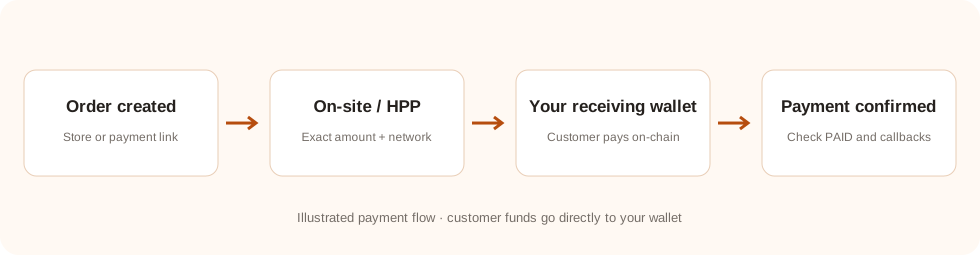 Payment-flow illustration. On-site and HPP use the same payment order; your server verifies its final status.
전체 지불 결과 보기
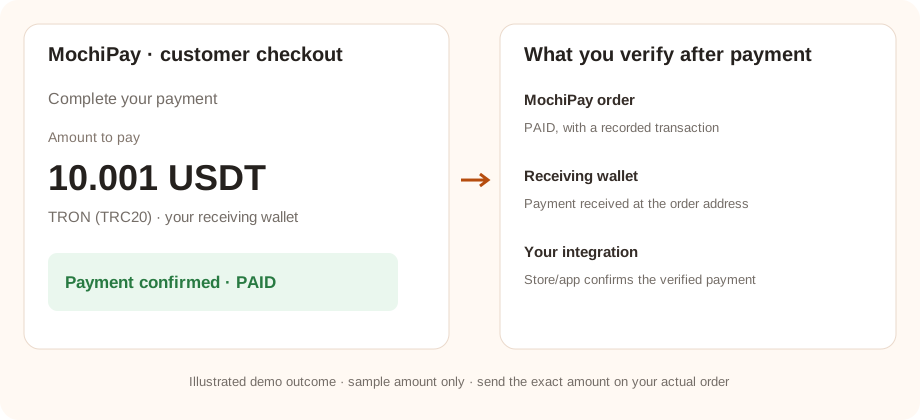
Demo illustration with sample values. Verify these outcomes using a real small payment in your own setup; the checkout amount and confirmation requirements depend on the order.
01 · 당신의 준비 MochiPay 계좌
- 계좌 만들기 그리고 가입을 활성화하는 방법.
- 오픈 지갑, Add HD Wallet → Generate New를 선택, 안전하게 복구 문장을 복구하고 지갑을 저장합니다.
- 인식 가능한 고객 얼굴 디스플레이 이름을 설정 프로필.
- 오픈 API 인증 정보 그리고 당신의 복사본 API 열쇠 및 저장 API 비밀이 저장되지 않으면, 처음 설정 및 안전하게 저장하기 위해 그것을 재생합니다.존재한 비밀을 재생하면 이전 비밀을 사용하는 통합을 무효화합니다.
준비가 되었을 때 : 귀하의 가입 및 수신 지갑은 활성이며, 아래에 필요한 인증서를 가지고 있습니다.
계정 설정에 대한 설명을 참조하십시오사이트를 선택하거나 HPP
| 모드 | 고객 경험 | 서버 책임 |
|---|
| 기본 사이트 (default) | 지불 대화는 자신의 도메인, 정확한 금액, 주소, 네트워크, QR 그리고 상태 | Create and store the payment binding; query through your own backend and return only a safe payment view. |
|---|
| HPP | 반환된 사람으로 돌려보내기 payment_url 에 MochiPay. | 동일한 링크를 저장하고 서버에서 서버로 전화 / 반환을 확인합니다. |
|---|
결제 모드는 통합을 선호하는 것이 아니라 API 필드. 두 링크 모두 하나의 명령을 사용합니다. 모드를 전환할 때 다른 명령을 만들지 마십시오. 클래식 SaaS 지원 HPP 오직
All five methods are available: USDT_TRC20, USDC_ERC20, BTC_BITCOIN, ETH_ERC20 and SOL_SOLANA. UP is the default unique amount direction; DOWN is also supported. Enable a receiving wallet for each offered method.
03 · 시험 명령을 배치하고 지불합니다.
Open order.php. Create a small demo order using a unique merchant order reference and a configured payment method. Select ON_SITE or HPP; open the preferred link shown after creation. The result also offers Embedded store checkout and PHP HPP redirect links; both are implemented in checkout.php. The alternative link uses the same order.
- 선택한 자산과 네트워크와 일치하고 지불 페이지에 표시된 정확한 금액을 보내십시오.
- 보내드리겠습니다 지불 페이지에 있는 정확한 금액 표시된 수신 주소로 주소를 회전하거나 다른 주문에서 주소를 다시 사용하지 마십시오.
- 필요한 블록체인 확인 및 MochiPay 명령이 되기 위해서
PAID.
The store/API example may price the product in USD. MochiPay locks the conversion when creating the order; unique amount adjustments can change the final payable amount. The checkout value is the amount to send.
성공 체크 : 그들의 MochiPay 주문은 PAID, 거래가 기록되어 있습니다. 브라우저 반환 페이지만 열면 지불이 증명되지 않습니다.
04 · 결과와 지갑 수신을 확인합니다.
Query the order by the system order_id from your application. Accept payment only after the authenticated query is PAID and matches your stored system ID, merchant reference, original amount/currency, selected asset/network, receiving address, exact payable amount and expected received amount. Fulfill through an atomic, idempotent local transaction. callback.php demonstrates this verification for notifications and browser returns, using private demo records. It does not fulfill orders; replace temporary records and the callback TODO with your production database and fulfillment transaction. Read the bundled README.
Match the payment transaction and receiving address with your MochiPay order. Review the receiving wallet or blockchain explorer. Funds are already in your receiving wallet; there is no platform withdrawal request.
호환되는 지갑을 사용하고 자금을 이동할 때 블록체인 확인을 기다립니다. 수신 - 현금 관리 가이드를 읽으십시오
회복 및 정확한 금액
현재의 순서를 만들기 전에 시도를 계속하십시오. PHP 데모 구원 request_id 그리고 주문을 만들기 전에 정확한 지불로드. 저장된 시스템 ID 없이 시간을 꺼낸 후, 동일한 지불 로드와 같은 지불로드를 철회합니다. request_id· 알려진 사람 order_id 오래된 레코드가 없어지지 않은 경우 request_id, 새로운 창조 전에 독특한 상인 참조를 묻습니다. PHP 또는 JavaScript 플로트 변환; 표시 pay_amount 정확히 말하자면, 묶여 있는 QR 주소만 암호화하여 고객이 표시된 금액을 입력해야 합니다.
자신의 건설을 할 때 API 고객
사용하기 X-Mochi-Key 그리고 X-Mochi-Signature명령은 정확한 명령을 표시합니다. JSON 기초를 사용하는 몸64- 암호화된 HMAC-SHA256. Query Order는 주요 질문 표시 없이 정확한 쿼리 라인을 표시합니다. 서명 서버 비밀 측면을 유지합니다.
시험이 완료되지 않으면
지불 옵션 또는 주문은 만들 수 없습니다.
구독 상태, 활성 수신 지갑, 지불 방법 코드, 인증서 및 주문 통화에 대한 교환율 쌍을 확인합니다. 플러그인을 위해, 또한 테스트에서 사용되는 스토어 범위/고객에 대한 방법을 확인합니다
지불은 여전히 기다리고 있거나 지불하지 않습니다.
거래와 함께 자산, 네트워크, 주소 및 정확한 지불 금액을 비교하십시오.필요한 확인을 기다리십시오.스크린 촬영 또는 브라우저 반환에만 기반으로 지불 된 스토어 주문을 표시하지 마십시오.
MochiPay 지불하지만 내 스토어 / 응용 프로그램은 업데이트되지 않습니다.
알림/전화 반환 끝점이 공개적으로 접근 가능한지 확인하십시오. HTTPS 그리고 인증 또는 화재 벽에 의해 차단되지 않습니다. 통합을 확인할 수 있습니다. MochiPay 그리고 그것의 오류 로그를 검사합니다. 지불 링크만 업데이트 MochiPay외부 가게가 아닌.
옵션 요청 Deduplication
기존의 통합은 계속 작동하지 않고 request_id시간 종료 후 동일한 지불 명령을 다시 사용하려면 선택적 인 명령을 추가합니다. request_id 서명한 사람에게는 JSON 기존 HMAC 서명을 계산하기 전에 몸.
{"merchant_order_id":"STORE-1001","amount":25,"currency":"USD","payment_method":"USDT_TRC20","request_id":"STORE-1001:create:v1"}
Use 1–64 ASCII letters, digits, dots, underscores, colons or hyphens. A key belongs to one merchant and one request payload. Reuse the same key and payload for retries; responses keep the existing fields and return the original order in its current state. Keys are retained without automatic expiry. For a genuinely new purchase, use a new key and a new merchant_order_id; an unpaid earlier purchase does not block the same amount on a different reference. WEB82.3 guards reference creation even without request_id. Query a legacy uncertain reference first; replay unchanged only after authenticated404 ORDER_NOT_FOUND with recovery_contract=merchant-reference-v1. Deploy the website API before recovery plugins.
HTTP 409 REQUEST_IN_PROGRESS: Retry-After 지연 후 동일한 요청을 철회합니다. HTTP 409 REQUEST_ID_CONFLICT: 키가 다른 지불 부하로 다시 사용되었습니다.새 키를 생성하지 마십시오. ON_SITE 그리고 HPP 반환된 지불 필드를 모두 사용할 수 있거나 payment_url 이전과 같이