← すべての統合ガイド統合ガイド API / バック / モバイルCrypto 支払いを統合する MochiPay API
Create and query payment orders from your application. PHP Demo 1.1.8 supports PHP 7.0–8.4 and provides order.php, callback.php, checkout.php with both presentation branches, bundled local dialog assets and an English README. Use on-site (default) or HPP with the same payment order.
デモ ウォーキング・イラスト・インフォメーション・デモ デモ・ウォーキー・インフォメン・デモ・インフォマン・デモは、自分の設定を確認するために、小さな現実の支払いを使用します。
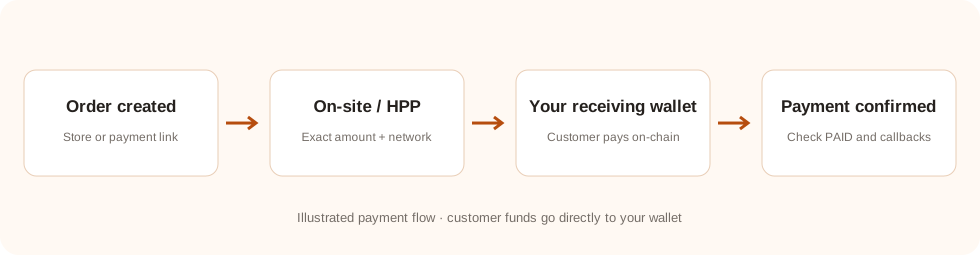 Payment-flow illustration. On-site and HPP use the same payment order; your server verifies its final status.
完全支払い結果を見る
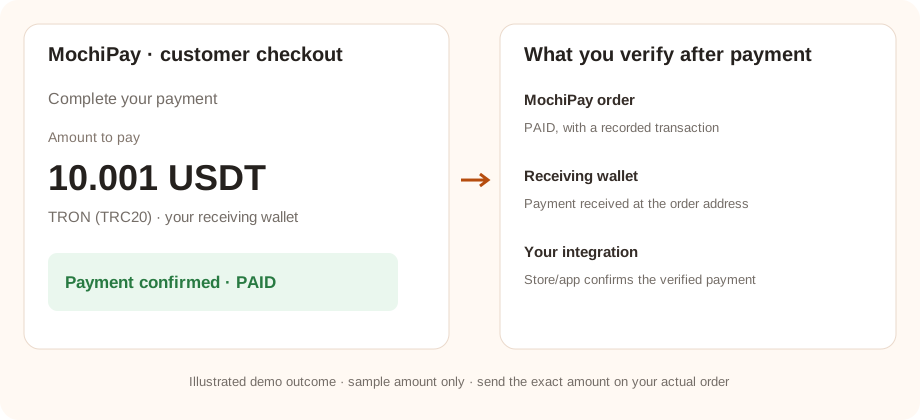
Demo illustration with sample values. Verify these outcomes using a real small payment in your own setup; the checkout amount and confirmation requirements depend on the order.
01 ■あなたの準備 MochiPay アカウント
- アカウントを作成 そして、 サブスクリプションを有効にする.
- オープン ウォレット, Add HD Wallet → Generate New を選択し、セキュアに回復フレーズをバックアップし、ウォレットを保存します。
- クライアントの顔を認識できるディスプレイ名の設定 プロフィール.
- オープン API認証情報 コピー あなたの API 鍵と保存 API 秘密が保存されていない場合は、最初の設定のために再生し、安全に保存します。既存の秘密の再生は、以前の秘密を使用する統合を無効にします。
準備が整ったとき: あなたのサブスクリプションとウォレットを受け取るアクティブであり、あなたは下記の必要な認証を持っています。
アカウントの設定を表示するサイトを選択するか、 HPP
| モード | 顧客体験 | サーバー責任 |
|---|
| デフォルト(デフォルート) | 自分のドメインでの支払い対話、正確な金額、住所、ネットワーク、 QR そして、地位。 | Create and store the payment binding; query through your own backend and return only a safe payment view. |
|---|
| HPP | 返品者への転送 payment_url で MochiPay. | 同じバンドを保存し、サーバーからサーバーに電話バック/返信を確認します。 |
|---|
チェックアウトモードはあなたの統合の好みであり、 API フィールド. 両方のリンクは 1 つのオーダーを使用します. モードを切り替える際に別のオーダーを作成しないでください. クラシック SaaS サポート HPP しかも。
All five methods are available: USDT_TRC20, USDC_ERC20, BTC_BITCOIN, ETH_ERC20 and SOL_SOLANA. UP is the default unique amount direction; DOWN is also supported. Enable a receiving wallet for each offered method.
03 ● 試験の注文を提出・支払う
Open order.php. Create a small demo order using a unique merchant order reference and a configured payment method. Select ON_SITE or HPP; open the preferred link shown after creation. The result also offers Embedded store checkout and PHP HPP redirect links; both are implemented in checkout.php. The alternative link uses the same order.
- 選択した資産とネットワークに匹敵し、支払いページに表示される正確な金額を送信します。
- 送る を 支払いページの正確な金額 表示された受信アドレスに表示されます. 別の注文からアドレスを回転または再利用しないでください。
- 必要なブロックチェーン確認を待つと、 MochiPay 成り立つ命令
PAID.
The store/API example may price the product in USD. MochiPay locks the conversion when creating the order; unique amount adjustments can change the final payable amount. The checkout value is the amount to send.
成功チェック: ☆☆☆☆ MochiPay 注文は PAID を表示し、取引が記録されます. ブラウザの返品ページだけを開くことは、支払いを証明しません。
04 ● 収入とウォレットの収入を確認する
Query the order by the system order_id from your application. Accept payment only after the authenticated query is PAID and matches your stored system ID, merchant reference, original amount/currency, selected asset/network, receiving address, exact payable amount and expected received amount. Fulfill through an atomic, idempotent local transaction. callback.php demonstrates this verification for notifications and browser returns, using private demo records. It does not fulfill orders; replace temporary records and the callback TODO with your production database and fulfillment transaction. Read the bundled README.
Match the payment transaction and receiving address with your MochiPay order. Review the receiving wallet or blockchain explorer. Funds are already in your receiving wallet; there is no platform withdrawal request.
互換性のあるウォレットを使用し、資金を移動する際にブロックチェーン確認を待つ。 受信ウォレット管理ガイドを読む →
回復と正確な金額
命令を作る前に試みを継続する。 PHP デモ保存 request_id オーダーを作成する前に正確な支払い負荷を取得します 保存されたシステムIDなしでタイムアウトした後、同じ支払い負担を返す request_id・知り合い order_id 古いレコードを記録しなく、 request_id, 新しい作成の前に、独特の商人の参照を尋ねる。 PHP あるいは JavaScript フラット変換; ディスプレイ pay_amount まさに、バンコク QR アドレスだけを暗号化するので、お客様は表示された金額を入力する必要があります。
自分自身を構築するとき API クライアント
利用 X-Mochi-Key そして、 X-Mochi-Signatureオーダーを作成する 正確なサイン JSON ベースを使用する身体64コード化 HMAC-SHA256Query Order は、主な質問マークなしで正確なリクエストラインをサインします。
試験が完了しない場合
支払いオプションまたは注文は作成できません。
サブスクリプションの状態、アクティブな受信ウォレット、支払い方法コード、クレジットおよび注文通貨の為替レートカップルをチェックします。
支払いはまだ待っているか未払いか
資産、ネットワーク、住所、および取引と正確に支払われる金額を比較します. 必要な確認を待つ. スクリーンショットまたはブラウザの返金に基づいて支払われたストア注文をマークしないでください。
MochiPay 支払いがかかりますが、私のストア/アプリは更新されていません。
通知/呼び出しの端点が公にアクセス可能であることを確認します。 HTTPS 認証またはファイアウォールによってブロックされない。 統合を確認するには MochiPay エラーログをチェックします. 支払いリンクだけ更新 MochiPay外部店ではない。
オプション・リクエスト・デドプリケーション
既存の統合は継続的に機能し続ける。 request_idタイムアウト後、同じ支払い注文を再利用するには、オプションを追加します。 request_id 署名者へ JSON 既存のHMAC署名を計算する前に、体を計算します。
{"merchant_order_id":"STORE-1001","amount":25,"currency":"USD","payment_method":"USDT_TRC20","request_id":"STORE-1001:create:v1"}
Use 1–64 ASCII letters, digits, dots, underscores, colons or hyphens. A key belongs to one merchant and one request payload. Reuse the same key and payload for retries; responses keep the existing fields and return the original order in its current state. Keys are retained without automatic expiry. For a genuinely new purchase, use a new key and a new merchant_order_id; an unpaid earlier purchase does not block the same amount on a different reference. WEB82.3 guards reference creation even without request_id. Query a legacy uncertain reference first; replay unchanged only after authenticated404 ORDER_NOT_FOUND with recovery_contract=merchant-reference-v1. Deploy the website API before recovery plugins.
HTTP 409 REQUEST_IN_PROGRESS: Retry-After 遅延後、同じ要求を撤回します。 HTTP 409 REQUEST_ID_CONFLICT: キーは別の支払い負荷で再利用されました. 新しいキーを生成しないで、タイムアウトを乗り越えるだけです。 ON_SITE そして、 HPP 両方とも返済フィールドを使用することができます。 payment_url 以前のように。